




Recently, I have fallen in love with Xamarin Studio add-ins and in my last blog post I took a look at how to edit markdown files easily. I was at Google I/O last week with Jérémie Laval and Jon Dick and he was working on binding the new awesome support libraries from Google and Jérémie and I saw Jon do something interesting…. Obliterate Output Paths from inside of Xamarin Studio’s context menus.
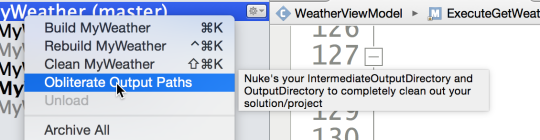
Immediately, we wanted to know exactly what Jon just did and how do we get this?!?!? Jon told us that he often has to ensure that the bin/obj folders are deleted completely and it was tedious to go through and delete them, so he wrote an add-in to do it for him!
To add the add-in simply follow my previous posts instructions pull up the Xamarin Studio Add-in Manager. Then you will want to install Redth’s Addins under IDE Extensions.
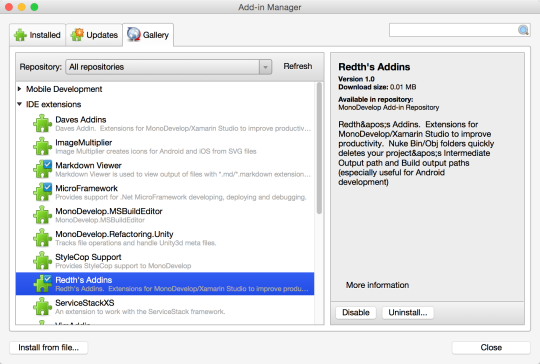
Now, from any single project or at a solution level you will see a new “Obliterate Output Paths”. #MindBlowing Simple and elegant and I hope you enjoy.